Block Gemini

Explore the connected ecosystem.

Opsyte retail campaignWhere do checkout queues build?

AI-managed advertising network

Put an AI CMO behind your ad spend.

Give Catalyst your market and budget. Its AI team buys across multiple traffic sources, learns which leads Sales qualifies and recommends which ad should get more budget.

OpsyteRetail campaign · Illustrative

Test spend · USD

Two ads. Equal budgets.

General ad
600
Queue demo
600
Catalyst campaign film

Illustrative budget · Move USD 100 to the queue demo.

General ad
USD 500
Queue demo
USD 700
Total
USD 1,200
Open the film directly

The AI marketing team

Four specialists. One AI CMO.

Each specialist reviews a different part of account performance. The AI CMO weighs impact and confidence, then prioritises the action for your team or your configured automation.

Budget agent

Which ad deserves more budget?

Reviews pacing, possible increases and reallocations within the campaign budget.

Creative agent

Which ad needs a refresh?

Looks for fatigue and flags a creative to refresh or a previous ad to test again.

Audience agent

Which audience is responding?

Examines segment efficiency to suggest a more focused targeting test.

Portfolio agent

What does the shift mean elsewhere?

Checks coverage and risk across the account before one campaign takes a larger share.

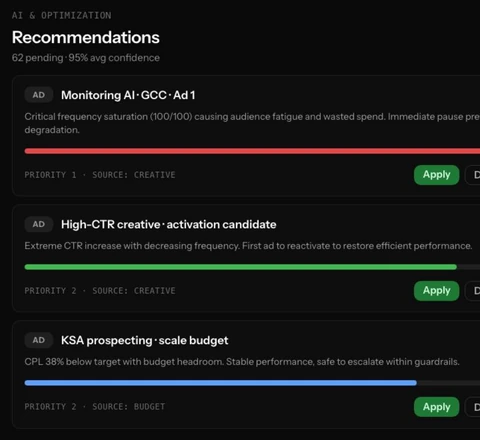
Catalyst recommendations to pause a tired ad, reactivate creative and test a budget increase
The recommendations screen in Catalyst. Your team can review each proposed change before applying it.

Approval and automation

Choose who has the final say.

Controlled
Review the reasoning and approve, modify or dismiss the recommendation.
Mixed
Set which decisions require review and which eligible actions may run automatically.
Self
Allow eligible actions to run within the account’s configured controls. Check the resulting performance at the next review.

How the network works

One brief. A network buying on your behalf.

You bring the offer and define the result. Catalyst handles media buying and campaign optimisation. You see what was spent, which enquiries came in and what Sales did with them once your CRM is connected.

Define the buyer.

Tell Catalyst what you sell, who you want to reach, where you can sell and how much you want to spend. Decide with Sales what makes an enquiry worth a conversation.

Example brief

A retail technology supplier wants demo requests from people responsible for checkout operations at multi-site retailers. A request qualifies when the retailer has a relevant site and wants to see the product.

Let Catalyst buy the traffic.

Catalyst buys advertising across multiple supply sources, including major platforms. It tests how audiences respond to your offer and manages the buying mix against your objective and budget.

What you can review

Review the offer, creative, spend and response for each campaign. Catalyst manages the individual suppliers privately. Your team sets the spending limits and decides which changes need approval.

Scale on sales feedback.

Connect qualified enquiries back to the campaign. The AI CMO and its specialist agents compare cost, audience response and lead quality to recommend where the next part of your budget should go.

When to hold spend

Give both groups the same time for follow-up. If Sales is still assessing leads, keep spend steady. When qualified volume and cost hold up, test a small increase and review the next group.

Campaign walkthrough

Follow the decision behind the spend.

Opsyte wants retail operators to book a demo of its queue analytics. Follow a fictional campaign from ad delivery to sales qualification and the next budget decision.

Review the Opsyte campaign example

Delivery + qualification

The lower-cost leads yielded fewer qualified demos.

Both ads spent USD 600 in the same week. Sales marked a request qualified when a retail operator had a relevant site and wanted a demo. Both groups had the same follow-up window.

Illustrative Opsyte campaign
MetricBroad adQueue demo
Enquiries3020
Qualified demo requests36
Cost per enquiryUSD 20USD 30
Cost per qualified requestUSD 200USD 100

A buyer watching a specific Opsyte use case was more likely to qualify in this sample. Keep the broader ad as a comparison.

AI CMO review

Give the queue demo a controlled test.

The Budget agent sees twice as many qualified requests for the same spend. The Creative agent asks whether the queue footage made the use case clearer. The Audience agent checks who responded. The Portfolio agent checks the proposed shift against the other campaign commitments.

Illustrative Opsyte campaign
Proposed allocationBroad adQueue demo
CurrentUSD 600USD 600
Next testUSD 500USD 700

The CMO combines the evidence into one recommendation with a reason. In Controlled mode your team can approve, modify or dismiss it before the change is applied.

Next review

Scale in steps and check the next cohort.

Keep the total test budget at USD 1,200. Give the next group of enquiries the same time to reach Sales. The team can then judge whether greater delivery still brings retailers who want a demo.

Illustrative Opsyte campaign
Next decisionWhat to review
Increase in stepsQualified volume and cost hold as spend rises.
Refresh the creativeFrequency rises while click-through and qualified response weaken.
Hold the budgetSales is still qualifying requests or the sample is too small.

This is an example review rule. Choose the qualifying criteria, budget cap and approval mode that fit your own sales cycle.

The Block Gemini sales workflow

From ad response to sales conversation.

Block Gemini can set up the handoff from your campaigns to Cadence and Echo. Choose your sales pipeline, the details that qualify a lead and the rules for when a call may go ahead.

Opsyte product example showing the checkout area of a retail store
OpsyteRetail queue analytics · Example offer
  1. Give the enquiry a commercial goal.

    In this example, the ad offers a queue analytics demo to retail operators. The offer and the campaign message give Sales context for the first conversation.

  2. Put the lead in the CRM.

    With a configured CRM handoff, route the enquiry to the relevant sales pipeline with its campaign and product interest. Sales can assign a follow-up and record whether the prospect qualifies for a demo.

  3. Call when the workflow permits it.

    An eligible, consented lead can enter a configured Echo calling workflow for a qualifying conversation. The team can use that outcome in the next campaign review.

Get started

Give your AI team its first campaign.

Bring to your first campaign

  • Your offer and the kind of enquiry Sales should qualify.
  • The market you want to reach and the budget available.
  • Your product brief or media, and the decisions you want to approve.