Less time gathering context. More time moving the right deals.
Research a company, understand why a lead deserves attention and turn a supplied conversation into a proposal draft. Cadence brings AI into the customer record, where your sales team can use it.
Explore real Cadence screens, from your shared pipeline to the AI apps that help your team prepare and follow through.
See who deserves your next conversation.
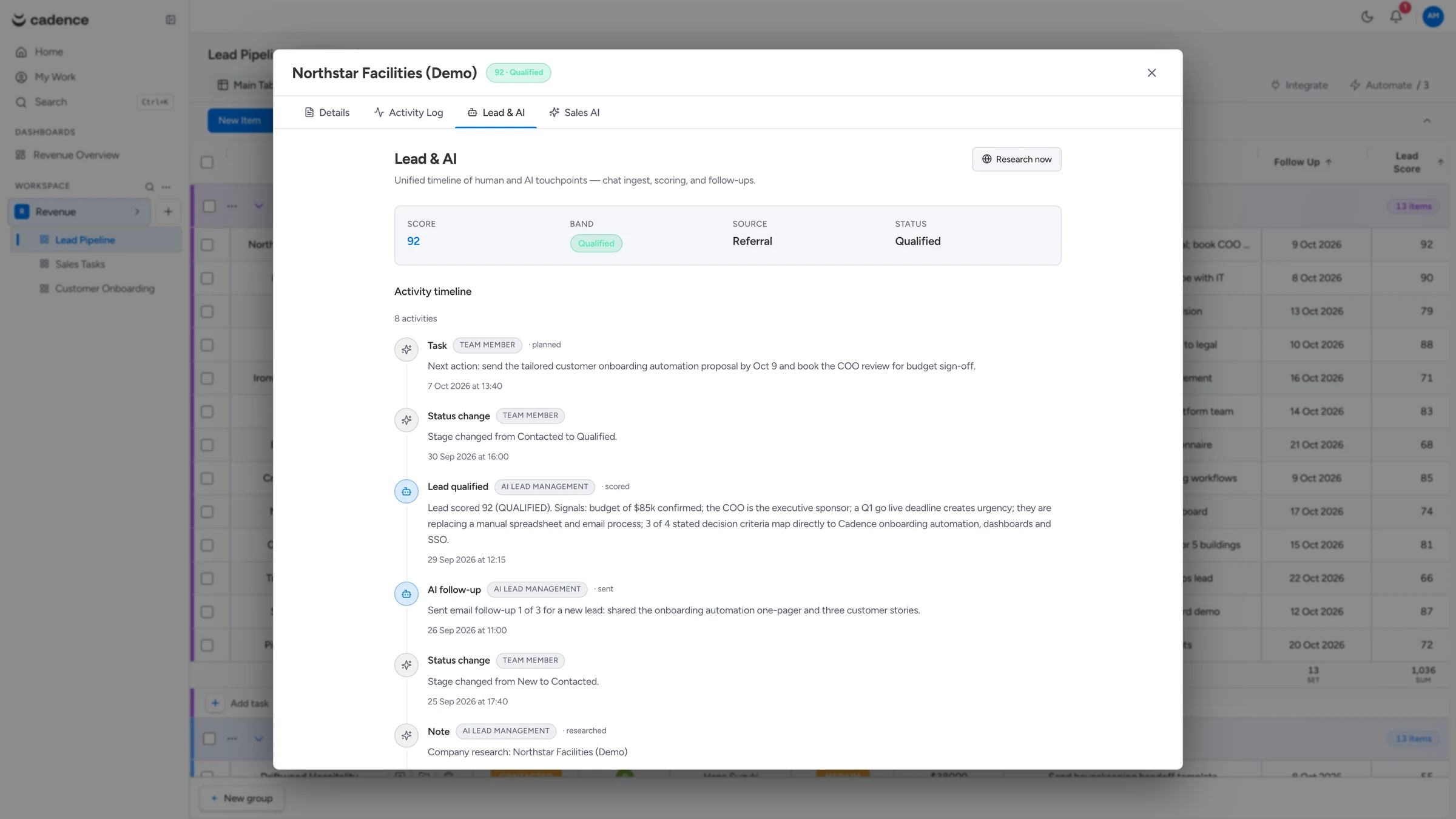
Review AI lead scores with their reasoning and contributing signals. Use the context to prioritise outreach and prepare your next question.
cadence.blockgemini.com
Actual Cadence interfaceFictional demonstration data · screenshots, not a live workspace
01
Prioritise with the reasoning in view.
A lead score is more useful when your team can see what informed it. Cadence combines the available lead information and interaction history, then shows the supporting signals and reasoning. Use that context to decide who to contact next and what to ask.
Lead scoring is included on paid plans.
Review the signals behind each score alongside the record.
Keep an owner and a practical next action attached to the opportunity.
02
Arrive at the conversation prepared.
Web Research adds company or contact context to your CRM. Research summaries retain source links, so your team can inspect where the information came from and use it to prepare relevant questions. It complements your relationship history rather than replacing it.
Research lives with the customer context.
Source links make the findings easier to review.
Included from Growth; available as a Launch add-on.
03
Turn a conversation into a proposal your team can review.
Supply a transcript from your team or a connected system. Sales Intelligence extracts requirements and sales context, your team reviews the findings, and Cadence prepares a draft PDF using your proposal branding preferences. You choose when and how to share it with the customer.
Start from a supplied transcript.
Review extracted requirements before generating the draft.
Included from Scale; available as an add-on on Launch and Growth.
INTELLIGENCE THAT MOVES THE WORK
From “what do we know?” to “what happens next?”
Bring useful AI into the moments that matter: understanding a lead, preparing a conversation and turning requirements into a proposal.
Illustrative workflow film with an English interface. Product screens and feature details are shown separately.
One customer record. A useful starting point.
Add the lead from an import or a configured channel. Assign an owner, review research and scoring, and decide the next conversation.
1Customer record
2AI context
3Owner & next action
Example workflow · AI apps and integrations require the relevant plan, credits and configuration.
YOUR BUSINESS. OUR HANDS-ON HELP.
You do not have to set it all up alone.
Start independently, or let Block Gemini help shape your boards, prepare your data, configure automations and connect your systems. Enablement is practical work delivered for your requirements.
Both. Cadence organises customer relationships in configurable boards and records, and connects that context to tasks, owners, dates and workflow actions. Sales, account and operations teams can shape the workspace around their process.
What does the AI actually do?
Lead Scoring prioritises leads with supporting reasoning. Web Research adds company or contact context with source links. Sales Intelligence analyses a supplied transcript, lets your team review the findings and generates a branded draft proposal PDF. AI requires a paid plan, the relevant app entitlement and available credits.
Can I start free?
Yes. Free is an ongoing plan for one organisation per business, with one full-access user, free Viewers, three boards, 1,000 records and 250 MB of storage. No trial or credit card is required. AI apps are available on paid plans. Confirm current terms in the Cadence platform.
Does every Block Gemini product connect automatically?
Connections are configured for your workflow. The Cadence overview documents Echo, Bridge, APIs and webhooks. The other portfolio examples on this page are opportunities to scope with our team, not a claim of pre-enabled connectors. Product subscriptions, third-party services and integration work may carry separate charges.
Can our existing data and process move into Cadence?
Cadence supports imports, configurable fields and boards. Start by mapping your current records, ownership and stages to the new workspace. Block Gemini enablement can help with data preparation, migration, workflow setup and scoped integrations. Agree the required systems and work before rollout.
How do subscriptions and AI credits work?
Paid plans are billed per seat each month and include an AI-credit allowance. App access is included in eligible plans or added for a monthly organisation fee. AI runs consume credits; app subscriptions do not add credits. Optional top-ups are available on paid plans. Exhausted credits pause AI while core CRM continues within plan limits. USD prices exclude applicable taxes.
Who sets up the boards, automations and integrations?
You can configure the workspace yourself or use Block Gemini enablement. Growth includes four hours once per organisation, Scale six, and Enterprise a twelve-hour baseline. Additional enablement is US$50/hour. Hours are valid for twelve months from allocation or purchase; extra purchases require your authorisation. Routine support and defect fixes do not consume enablement hours.
Bring your customer journey into one intelligent rhythm.
Start with your first board. Build the workflows and connections your business needs next.
With your permission, Google Analytics and any configured ChatGPT Ads measurement help us understand useful pages and actions. We never include form messages in measurement events. Privacy